CRON Job
How to create CRON job:
Step 1:
Here's how to set up the CRON job:
Step-by-step instructions:
- Open Terminal: Access the terminal or command-line interface provided by your hosting platform.
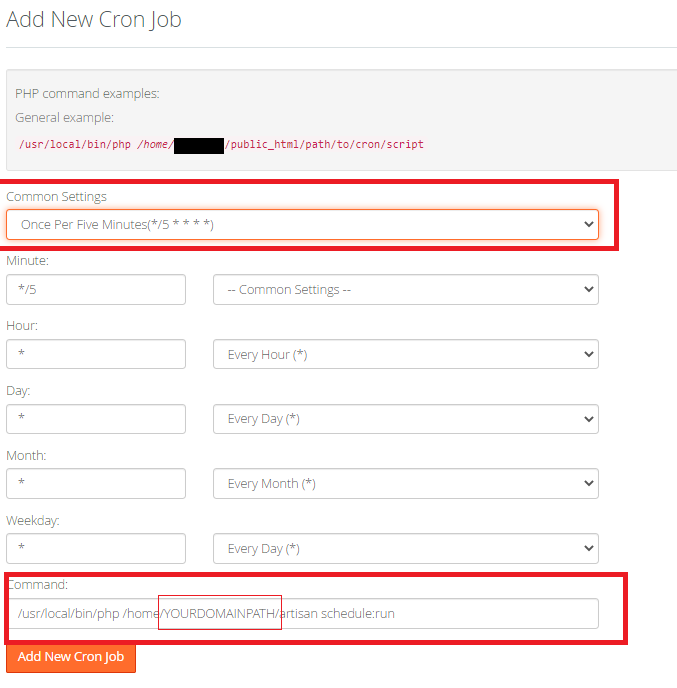
- cPanel users: If you're using cPanel, you can bypass the terminal. Go to the Cron Jobs section and paste the instruction from Step 3 directly there.
Step 2: Execute the command crontab -e in your terminal.
crontab -e
Step 3: Insert cron job to automate escrow every minute. Ensure to replace YOURWEBSITE DOMAIN PATH with your specific domain path:
* * * * * /usr/local/bin/php /home/YOURDOMAINPATH/artisan schedule:run >> /dev/null 2>&1
Step 4: (If using terminal): To view all local cron jobs, enter the command:
crontab -l
Step 5: If configuring through cPanel, the setup should resemble the following. Select the smallest available time interval provided by your hosting service, ideally every 1 minute if supported. Adjust YOURDOMAINPATH accordingly, ensuring it includes your hosting username as specified in your directory.